
SSL is a protocol that encrypts the data sent between your computer and the server you’re connecting to. It’s used for protecting sensitive information, like credit card numbers, passwords, and other personal information.
This means that, even if someone were to intercept your data as it travels through the internet, they wouldn’t be able to read it.
Wait, will someone be able actually to read the data that I submit via forms?
Yes. When connected through plain HTTP protocol, the website data, the data you submit via forms, and almost anything that comes and goes out of your computer into the internet can be intercepted and extracted.
For example, if you’re accessing your bank portal through an HTTP protocol, an intruder can actually see the username and passwords that you use to log in to your bank portal. And if you view your account statement after logging in, the intruder can see that too and see precisely how much your account balance is.
This is why an SSL Certificate is absolutely necessary.
What an SSL does?
Well, the primary job of the SSL is to encrypt the data that is sent and received by a server.
So, if you’re searching for “Buy Sneakers,” the particular search term is converted into something like “FOfdg78s@.” If any intruder tries to intercept your network, they can’t get any valuable data out of it, as everything looks only like gibberish.
The server and your browser will know how to convert this gibberish into actual word – but no one else.
So, when browsing a website with an SSL certificate, you can rest assured that any data that you transfer to them cannot be intercepted midway.
Non-SSL Websites attract Warning in Browsers.
SSL used to be a fancy optional feature back in the day. But, given the number of security risks involved in browsing an insecure website that operates without an SSL certificate, popular browsers are now prioritizing user security with new SSL-related features that keep the user safe.

The latest browser versions of Safari, Chrome, and Firefox show a “Website Not Secure” message more prominently when you are accessing a website that doesn’t have an active SSL certificate so that you can actually refrain from sharing any sensitive information through forms or other mediums available on the particular website.
Who is responsible for maintaining the SSL certificate of a website?
Website owners, or as they are usually called, “Webmasters,” are ultimately responsible for obtaining, installing, and managing SSL certificates on their respective websites.
The usual process is that the website owner has to buy an SSL certificate from a Certificate Authority and get the certificate installed on their web server like Apache or NGINX.
Once installed, his/her website will start working in the HTTPS protocol, which is the SSL-secured version of the plain HTTP protocol.
Cost and Types of SSL Certificates
If you’re a webmaster and want an SSL certificate for your website, be noted that there are an overwhelming number of SSL vendors on the internet and many types of SSLs available. In this section, we will briefly analyze the available types and expected costs for the same.
DV SSL Certificate.
DV SSL Certificate is an abbreviation of Domain Validated SSL Certificate.
A DV SSL is the simplest and most cost-effective SSL Certificate type that’s available on the market. In order to obtain a DV SSL Certificate, all you need to do is verify your domain’s ownership, and voila, you will get your SSL in less than 5 minutes.
Thanks to its simplicity, it is one of the most cost-effective options available. You can expect to buy a DV SSL for as low as $10 a year.
OV SSL Certificate
Organization Validated SSL Certificate is called an OV SSL.
In contrast to domain-validated SSL, you will have to provide proof of your business to the Certificate Authority to obtain an OV-SSL for your website. The proof may be a utility bill, incorporation certificate, or sale tax registration certificate.
The basic idea is that, on top of verifying your website’s ownership, you also have to verify your business ownership. Due to the additional business verification process, issuing an OV SSL Certificate may take up to 2-3 business days after all requested documents are uploaded compared to 5 minutes issuance of a DV SSL.
OV SSL Certificate costs may vary significantly. It varies from vendor to vendor, and different certificate authorities offer OV SSL at different pricing points. You can expect the cheapest OV SSL to cost around $100, and options go up to $300 per year.
EV SSL Certificate
EV’s full form is Extended Validated SSL.
Like in OV, in EV too, you are required to verify your business. But, the criteria for EV are relatively higher than that of an OV SSL. For instance, EV SSL is issued only for corporates listed on government websites (like Companies House in the UK, Ministry of Corporate Affairs in India, etc.)
In the olden days (no, not 1900s or 2000s, but in late 2017), an EV SSL Certificate will show a Green Colored address bar on the browser, intimating the user that the website is a verified website of that particular company.
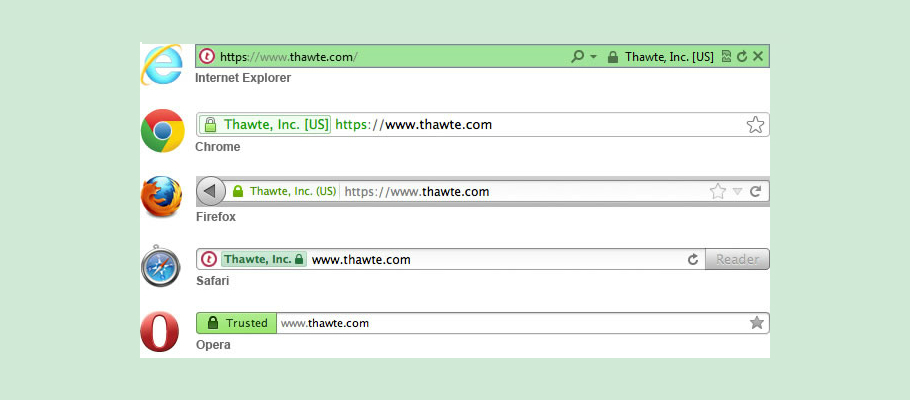
In today’s browser versions, an EV SSL will not show a green-colored address bar anymore.
But still, when looking at the certificate information, the name of the company will be displayed.
In addition to that, EV SSL Certificates come with a lot higher SSL warranty (in millions of USDs), making it ideal for usage in critical applications such as banking, finance-related websites, and large-scale e-commerce applications.
Speaking about the price, EV SSL certificates are available as low as $150 a year, and an EV SSL from a reputed and premium brand would cost as much as $600 a year.
Well, now you know it all!
You know what an SSL certificate is, its types, and how much it would cost. We’re glad to see you made it to the end. If you own a website, now is the perfect time to get it protected with an SSL.